Cockpit add-on
A message when an add-on on a server needs attention
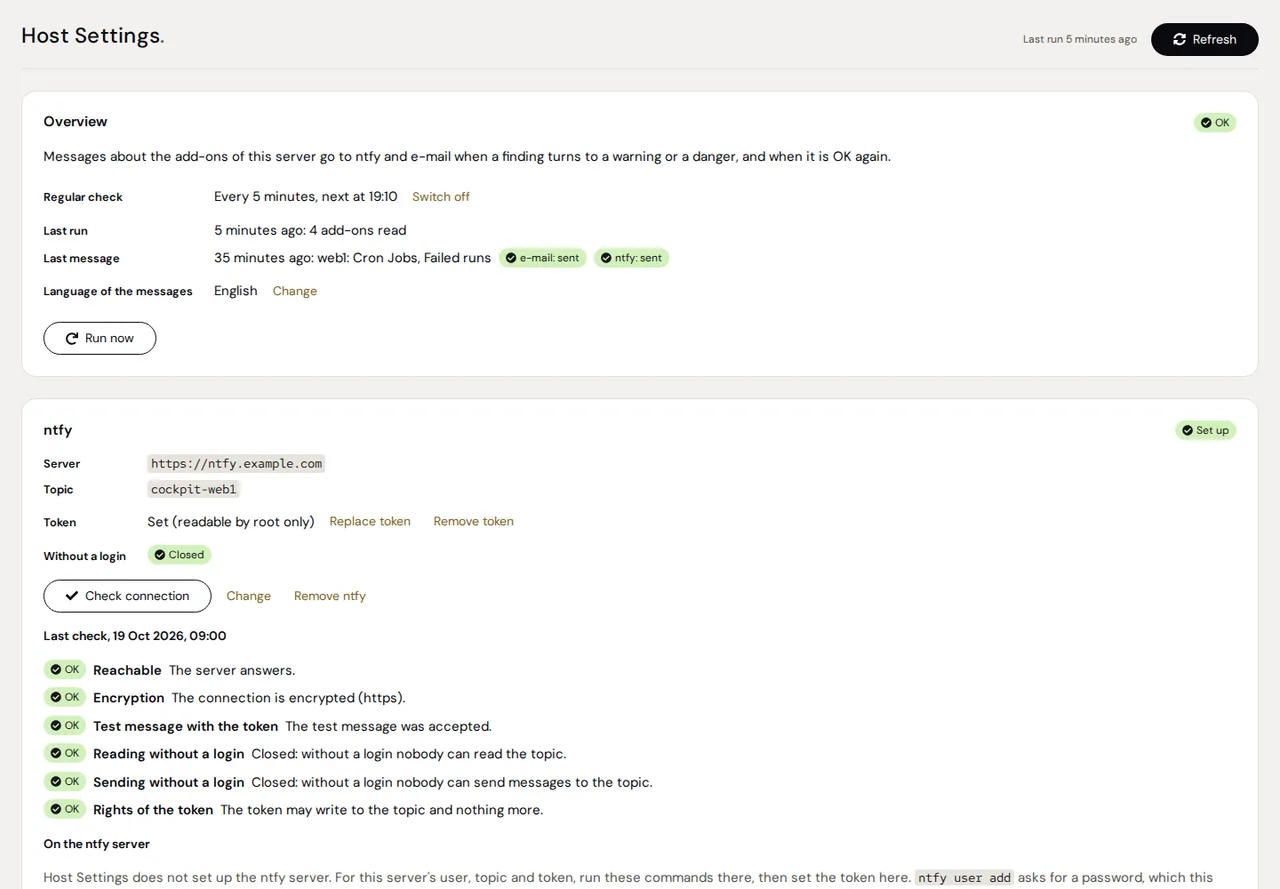
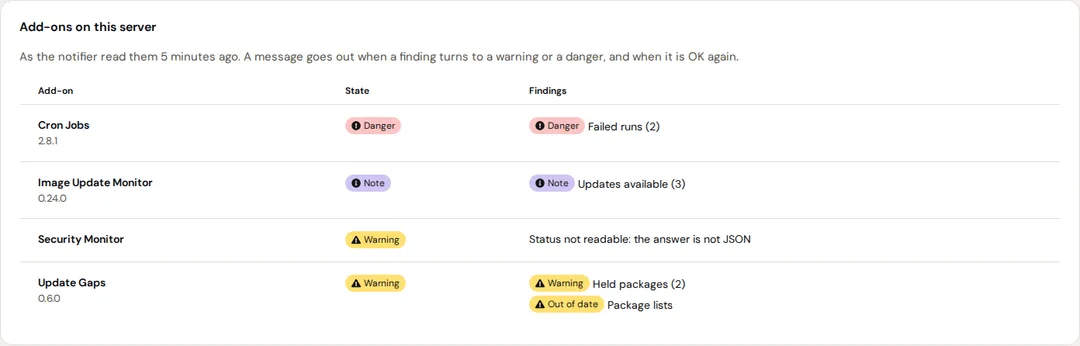
Host Settings reads what Cron Jobs, Image Update Monitor, Update Gaps, Security Monitor and any other add-on with the status contract report on the same server, judged as Status Board judges them, and sends a message through ntfy, e-mail or both when a finding turns to a warning or a danger, and when it is OK again.
- Stable
- Version 0.1.0
- Apache-2.0
- Cockpit
- Debian & Ubuntu
- Fedora & RHEL
The problem
A page only helps while someone looks at it.
Every add-on shows its findings on its own page. Status Board puts them on one page, but it loads only while that page is open and notifies no one.
A message for every state would be noise. What matters is the change: a finding that turns to a warning or a danger, and the moment it is OK again.
An ntfy topic that is open without a login lets anyone who knows its name read what is wrong with your server.
Features
What it does
Changes, not states
A message when a finding turns to a warning or a danger, when a danger becomes a warning, and when it is OK again or no longer reported. A second finding in an add-on that is already a warning is told as well.
Quiet when nothing changes
The same change of the same finding comes at most once an hour, and several changes of one run come as one message. The first run after setting up sends a summary of what the add-ons report then.
ntfy, e-mail or both
Any ntfy server, with a token or without: a danger comes with a high priority, a warning with the default one, OK again with a low one. E-mail goes to the server's own mail server on localhost:25.
Check connection
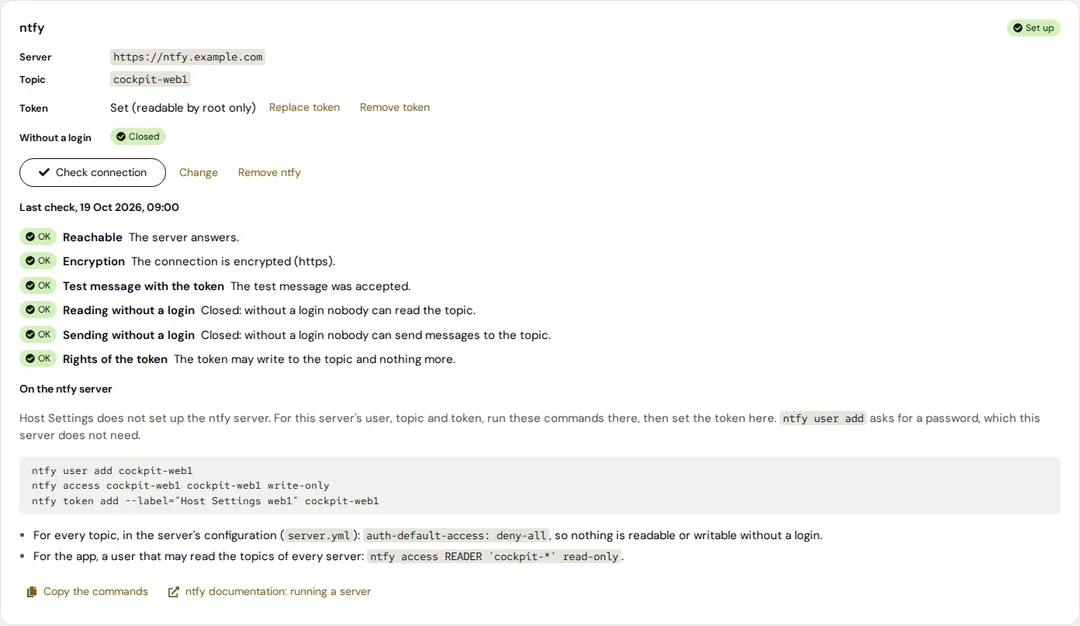
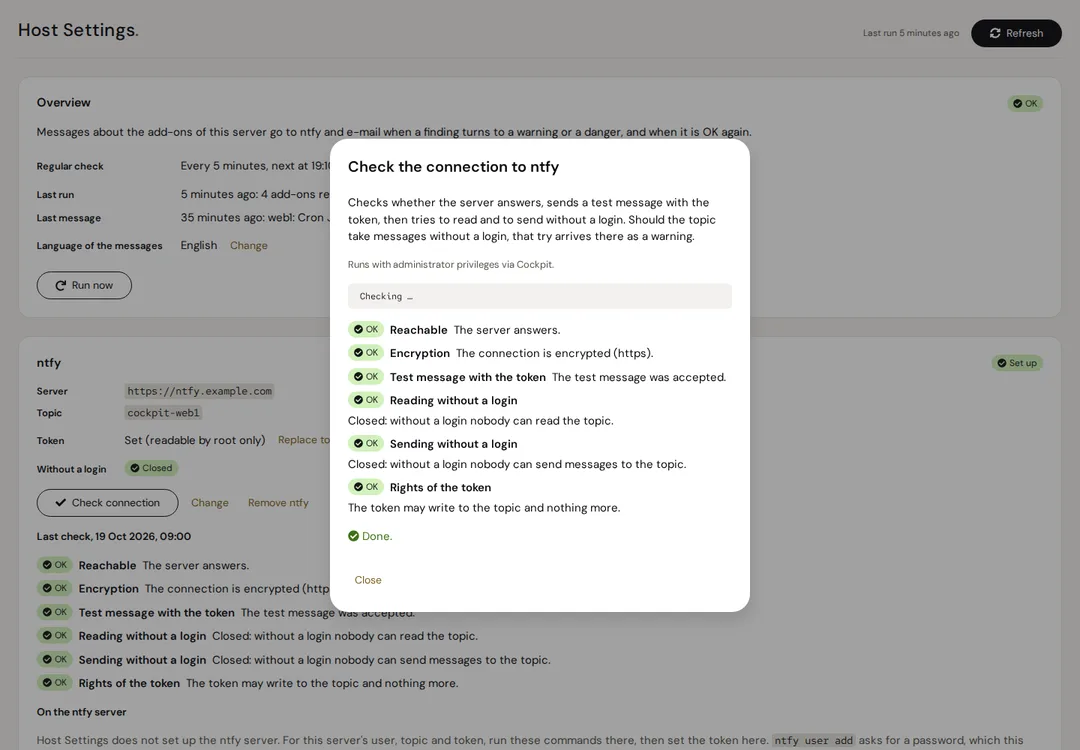
The page checks the way to ntfy: the server answers, the connection is encrypted, the token may publish, and the topic is closed to anyone without a login, for reading and, on request, for sending.
Commands for the ntfy server
The user, its write access to the topic and the token this server needs, ready to copy. Host Settings does not set up the ntfy server itself.
Its own state on Status Board
Whether messages are set up, whether the last one went out, whether the topic is closed and when the notifier last ran: Status Board shows it, Cockpit's menu shows it as an icon.
When a message comes
Host Settings makes no checks of its own: it tells only what the add-ons on its server report, every 5 minutes. Only warnings and dangers count as problems.
| What happens | Message |
|---|---|
| A finding turns to a warning or a danger | Yes; on ntfy a danger comes with a high priority |
| A danger becomes a warning | Yes |
| A finding is OK again or no longer reported | Yes, “OK again”, on ntfy with a low priority |
| An entry is older than its add-on allows | Yes: it counts as a warning |
| An add-on's status cannot be read | Yes: the add-on itself counts as a warning |
| The same change of the same finding within an hour | No, not before the hour is over |
| The first run after setting up | A summary of what the add-ons report then |
Screenshots
Security
- The notifier never runs as root: it runs as a system user of its own, hardened by systemd, and may write only its state.
- A status command runs only when it lies below /usr/lib/cockpit-NAME/ and it and its folders belong to root and nobody else can change them.
- The ntfy token goes from the page to the helper on standard input, lies in a file only root can read and reaches the notifier as a systemd credential. It leaves the server only as the header of a request to the ntfy server set up; redirects are not followed. The page never shows it.
- A message holds only what the add-ons report, their names and the server's name. What an add-on reports reaches the page and the messages as text, cut and cleaned of control and bidirectional characters.
- The page changes something only through its dialogs, with administrative access. Sending without a login is tried only when you press Check connection; should the topic accept it, that message itself is the warning.
- The page loads nothing from the network: it brings its own fonts and icons.
Install
Installation
Requirements
- Cockpit 264 or newer
- Python 3.8 or newer, systemd 247 or newer and ss (iproute2)
- For e-mail: a mail server that accepts mail on localhost:25, such as postfix or exim
- For ntfy: an ntfy server this server can reach
- Add-ons with the status contract, such as Cron Jobs, Image Update Monitor, Update Gaps and Security Monitor
Install it on every server that should send messages.
From the Azentrius package repository
For Debian, Ubuntu, Fedora and RHEL. Set up the repository once:
# Debian and Ubuntu
curl -fsSLO https://packages.azentrius.com/azentrius-repository.deb
sudo apt install ./azentrius-repository.deb
sudo apt update

# Fedora and RHEL
sudo rpm --import https://packages.azentrius.com/azentrius.asc
sudo dnf install https://packages.azentrius.com/azentrius-repository.rpm
Then install Host Settings in Cockpit under Applications, or on the console:
sudo apt install cockpit-host-settings    # Debian, Ubuntu
sudo dnf install cockpit-host-settings    # Fedora, RHEL
The system’s updates keep it current. The regular check stays off until it is set up: open the page with administrative access, set up ntfy, e-mail or both, then the regular check. Its first run sends the summary.
From the files of a release
Every release has the .deb, the .rpm, SHA256SUMS and a signed build provenance. Check both before you install:
sha256sum --ignore-missing -c SHA256SUMS
gh attestation verify cockpit-host-settings_X.Y.Z-1_all.deb --repo Azentrius/cockpit-host-settings
sudo apt install ./cockpit-host-settings_X.Y.Z-1_all.deb    # or: sudo dnf install ./cockpit-host-settings-X.Y.Z-1.noarch.rpm
Setting up ntfy step by step, troubleshooting and uninstalling: see the README.
Questions
Does it check the server itself?
No. It tells only what the add-ons on its own server report, judged as Status Board judges them. It holds no settings of the other add-ons; each keeps its own.
Do I need it on every server?
On every server that should send messages: it reads only the add-ons of its own server.
Does it set up the ntfy server?
No. The page shows the commands the ntfy server needs for this server's user, topic and token; you run them there. With auth-default-access: deny-all on that server and a token for this server's user, nobody else can read or send to its topic.
What if the server is off or cannot reach ntfy?
While the server is off, nothing comes, and while it cannot reach the ntfy server or its mail server, nothing comes that way. A message that could not go out on any channel is sent again on the next run, and Status Board on the host that reaches the others shows a server that does not answer as unreachable. When a message did not go out, Host Settings' own entry on Status Board says so.
Why does e-mail need a mail server on localhost:25?
The notifier hands its mail to the server's own mail server, such as postfix or exim, which delivers or relays it. A sendmail command alone (nullmailer, msmtp, dma) is not used: the notifier's sandbox ignores the setgid bit postfix' postdrop needs.
Is every open port told on its own?
Not in 0.1.0: it compares each entry of an add-on as a whole, so a further port open to the internet while that entry is a danger already gives no new message. From the release after 0.1.0, each finding an add-on lists behind an entry, such as each port reachable from the internet, is told on its own, and again if it comes back.
What about Cockpit's own settings?
Host Settings has one tab so far, Notifications. A second one for Cockpit's own settings in /etc/cockpit/cockpit.conf is planned.
How it differs
Status Board shows the state of every host while its page is open and notifies no one. Host Settings runs on each server, also when nobody looks, and tells the changes through ntfy or e-mail. It makes no checks of its own: what it tells comes from Cron Jobs, Image Update Monitor, Update Gaps, Security Monitor and the other add-ons with the status contract.
Further reading
Also by Azentrius
- Status Board – The state of the Azentrius add-ons on every host of Cockpit's host switcher, one row per host, one tile per add-on.
- Security Monitor – Per port where it is reachable from and which rule decides, plus SSH, logins, container hardening, CrowdSec and fail2ban.
- Update Gaps – Where a server misses updates although Software Updates lists none, and for every finding why and what you can do.