Cockpit add-on
Find the updates Software Updates does not list
Held packages, fixes only with Ubuntu Pro, a pending restart, a kernel update that ran out of room in /boot: for every finding the page says what is missing, where the information comes from, why Cockpit's Software Updates does not show it and what you can do.
- Stable
- Version 0.7.1
- Apache-2.0
- Cockpit
- Debian 12+
- Ubuntu 22.04+
The problem
No updates is not the same as up to date.
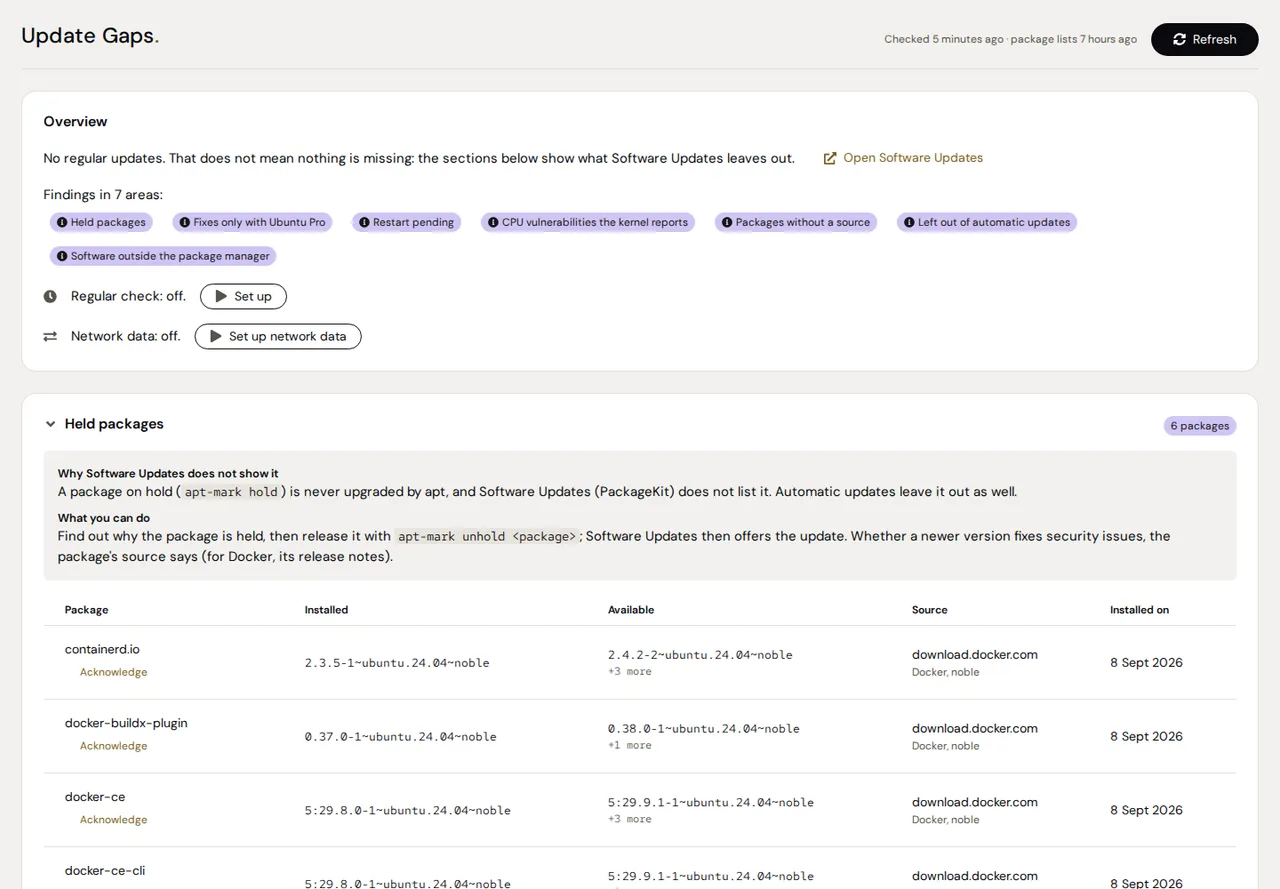
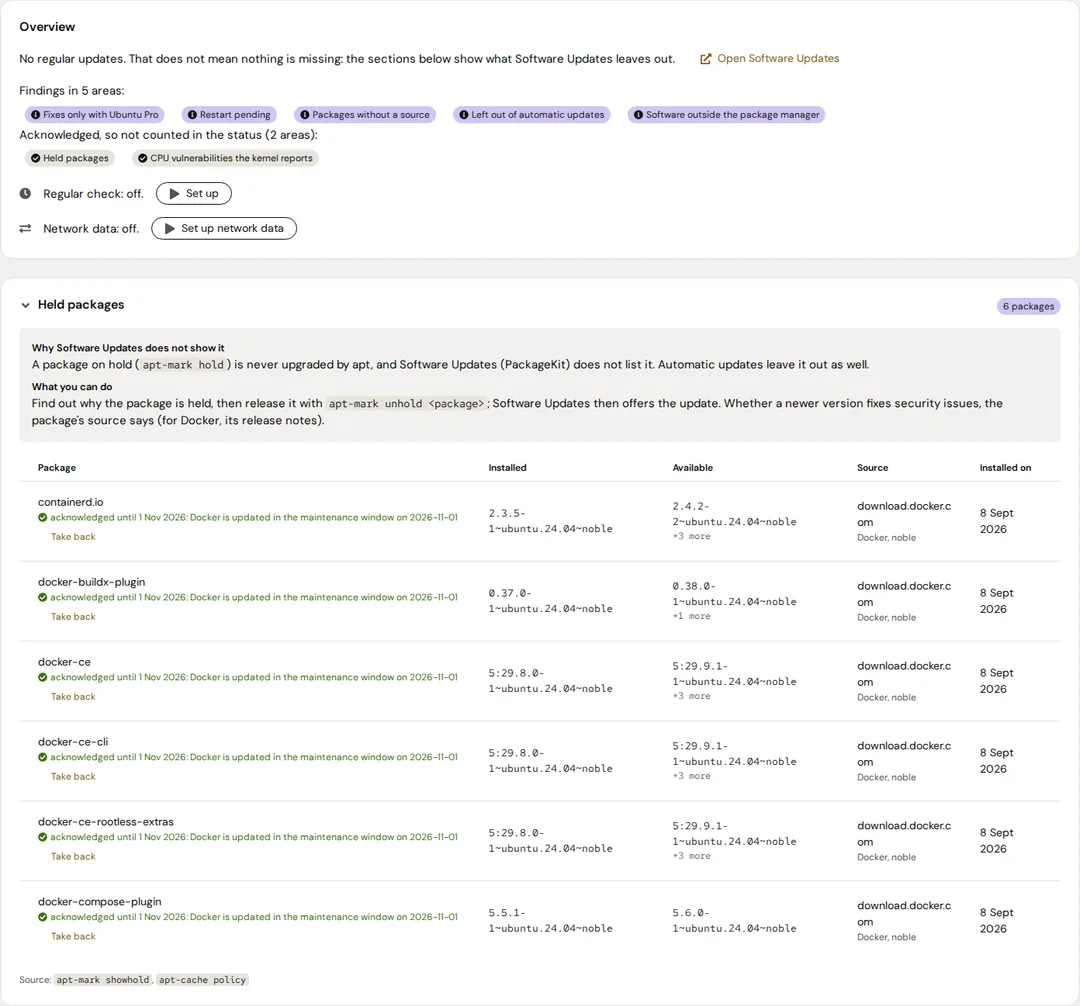
A package on hold is never upgraded, and Software Updates does not list it.
Once the last signing key of a source has expired, apt reads that source no more and its updates drop out of every list. Only apt update warns.
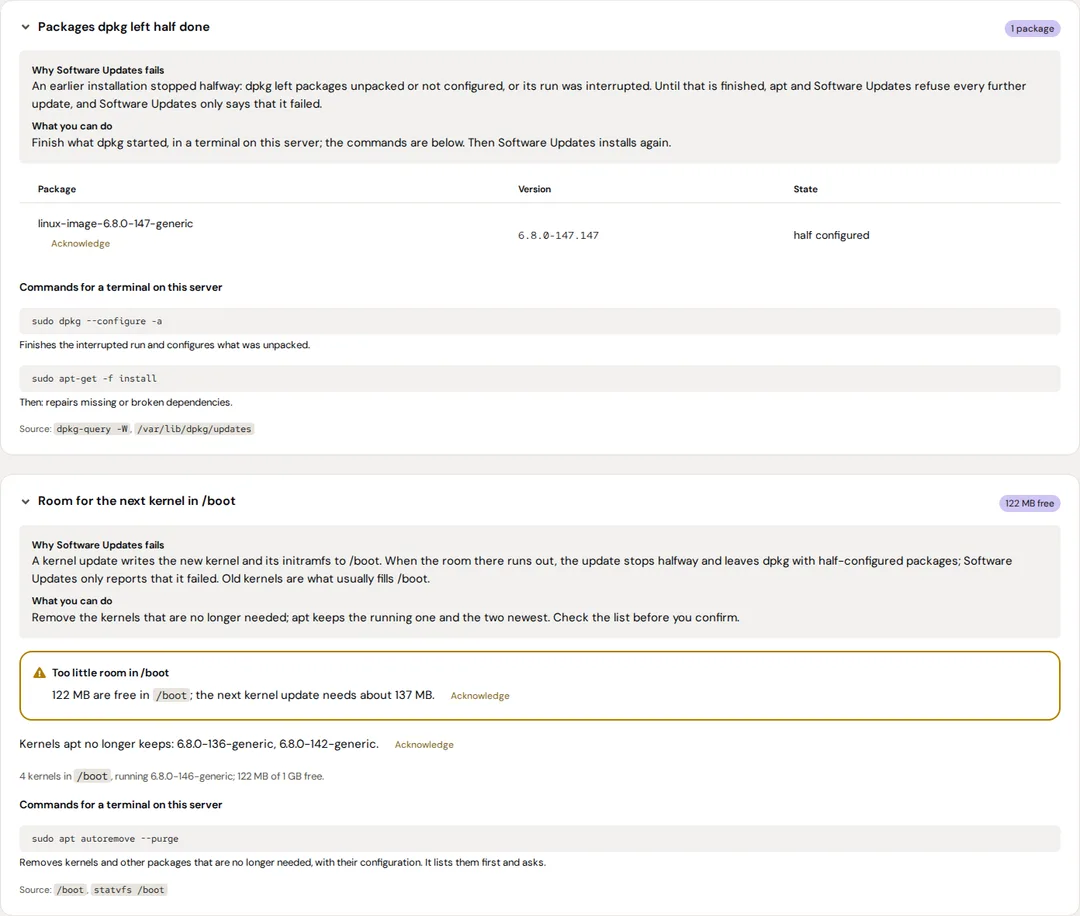
A kernel update that runs out of room in /boot stops halfway and leaves dpkg half done. Software Updates only says that it failed.
Features
What it does
What Software Updates leaves out
Held packages, fixes only with Ubuntu Pro, a pending restart, CPU vulnerabilities the kernel reports, firmware (with fwupd), snaps that are not refreshed, packages without a source, backports, software outside the package manager and the end of support.
Upkeep gone wrong
Packages dpkg left half done, too little room in /boot for the next kernel, expired signing keys, old package lists, phased updates Software Updates fails on, and what the last run of the automatic updates did.
Why, and what you can do
Every card says why Software Updates does not show it, what you can do and where the data come from. Commands are there to copy into a terminal; the page installs nothing.
Since when
A finding an earlier check saw as well says since when it has been there. The page always says how old its data is and when apt last updated its package lists.
Acknowledge for a while
With administrative access, a finding that is meant to be there can be acknowledged until a day you pick, at most 90 days ahead, with an optional reason. The page keeps showing it; the status stops counting it.
Network data, if you want them
Once set up, an unprivileged service fetches once a day the security issues Ubuntu has not fixed yet, fixes released upstream and newer versions elsewhere in Ubuntu.
Why Software Updates does not show them
A few of the areas the add-on checks, and why Cockpit's Software Updates misses them. An empty section never means safe: the page lists what it did not check.
| Area | Why Software Updates does not show it |
|---|---|
| Held packages | A package on hold is never upgraded, and PackageKit does not list it. |
| Fixes only with Ubuntu Pro | Without Ubuntu Pro, apt has no source for esm-apps and esm-infra. |
| Restart pending | On Debian and Ubuntu, Cockpit does not tell when a restart is pending. |
| Phased updates (Ubuntu) | Software Updates lists them, but its install fails on them, and on every other update with them. |
| Signing keys of the sources | Once the last key of a source has expired, apt reads that source no more; only apt update warns. |
| End of support | Cockpit does not show when a release stops getting updates. |
Screenshots
Security
- Read only: the check never runs apt update and never installs, removes or restarts anything. The page can only switch its own regular check and the network data on or off, and acknowledge findings.
- Every check runs as a hardened systemd service without network access, also when you press Refresh.
- Network data come only once you set them up, from an unprivileged service of their own. What leaves the server: the release name, the names of selected source packages and which of a fixed list of projects are installed.
- Credentials in the addresses of package sources are removed from the state, which every local user can read.
- The browser makes no external requests: the fonts ship with the add-on.
Install
Installation
Requirements
- Debian 12 or newer, or Ubuntu 22.04 or newer, with systemd
- Cockpit 264 or newer
- Python 3.8 or newer (standard library only)
- Optional, used when present: needrestart, ubuntu-pro-client, distro-info-data, unattended-upgrades, gpg, fwupd
From the Azentrius package repository
For Debian and Ubuntu. Set up the repository once:
curl -fsSLO https://packages.azentrius.com/azentrius-repository.deb
sudo apt install ./azentrius-repository.deb
sudo apt update
Then install Update Gaps in Cockpit under Applications, or on the console:
sudo apt install cockpit-update-gaps
The system’s updates keep it current. Install it on every server you look at in Cockpit, then open the page once with administrative access: it checks the server by itself. Set up the regular check there, and the network data if you want them.
From the files of a release
Every release has the .deb, SHA256SUMS and a signed build provenance. Check both before you install:
sha256sum --ignore-missing -c SHA256SUMS
gh attestation verify cockpit-update-gaps_X.Y.Z-1_all.deb --repo Azentrius/cockpit-update-gaps
sudo apt install ./cockpit-update-gaps_X.Y.Z-1_all.deb
Supported systems, settings and uninstalling: see the README.
Questions
Does it install updates?
No. It only reads. Where a card gives commands, they are for you to copy into a terminal.
Does an empty page mean the server is safe?
No. An empty section never means safe: the page always says what it did not check, what was skipped and how old its data is.
Which systems does it check?
Debian 12 and newer and Ubuntu 22.04 and newer. Fedora, RHEL and openSUSE are not checked yet, and the package repository serves the add-on for Debian and Ubuntu only.
Does it send data anywhere?
Only once you set up the network data. Then, once a day, the release name goes to Canonical's security metadata, the names of selected source packages to Launchpad, and which of a fixed list of projects are installed to GitHub.
Can I silence a finding I know about?
Yes, with administrative access: acknowledge it until a day at most 90 days ahead. It stays on the page and counts again after that day, or as soon as it changes in a way that matters. Some findings, such as a pending restart, cannot be acknowledged.
Does it check container images?
No. Image Update Monitor shows the versions of your containers.
Do I need it on every server?
Yes, on each server you look at in Cockpit, also behind a Cockpit bastion. Status Board shows the state of all of them on one page.
How it differs
Software Updates compares the installed packages with the package sources. Update Gaps looks at what that comparison leaves out, and at the state of the system around it. It changes nothing on its own. Container images are for Image Update Monitor, what is reachable from where for Security Monitor.
Further reading
Also by Azentrius
- Security Monitor – Per port where it is reachable from and which rule decides, plus SSH, logins, container hardening, CrowdSec and fail2ban.
- Image Update Monitor – Configured, running and newest Docker versions, with a rollback image and dumps for supported databases.
- Status Board – The state of the Azentrius add-ons on every host of Cockpit's host switcher, one row per host, one tile per add-on.