Cockpit add-on
What is reachable from where, who logs in, what weakens the containers
For every port: whether a new connection gets in from the internet, the VPN, the private network or only the server itself, for IPv4 and IPv6, and which rule decides. It reads UFW, nftables and iptables, and the ports Docker forwards past UFW.
- Stable
- Version 0.3.1
- Apache-2.0
- Cockpit
- Debian 12+
- Ubuntu 22.04+
The problem
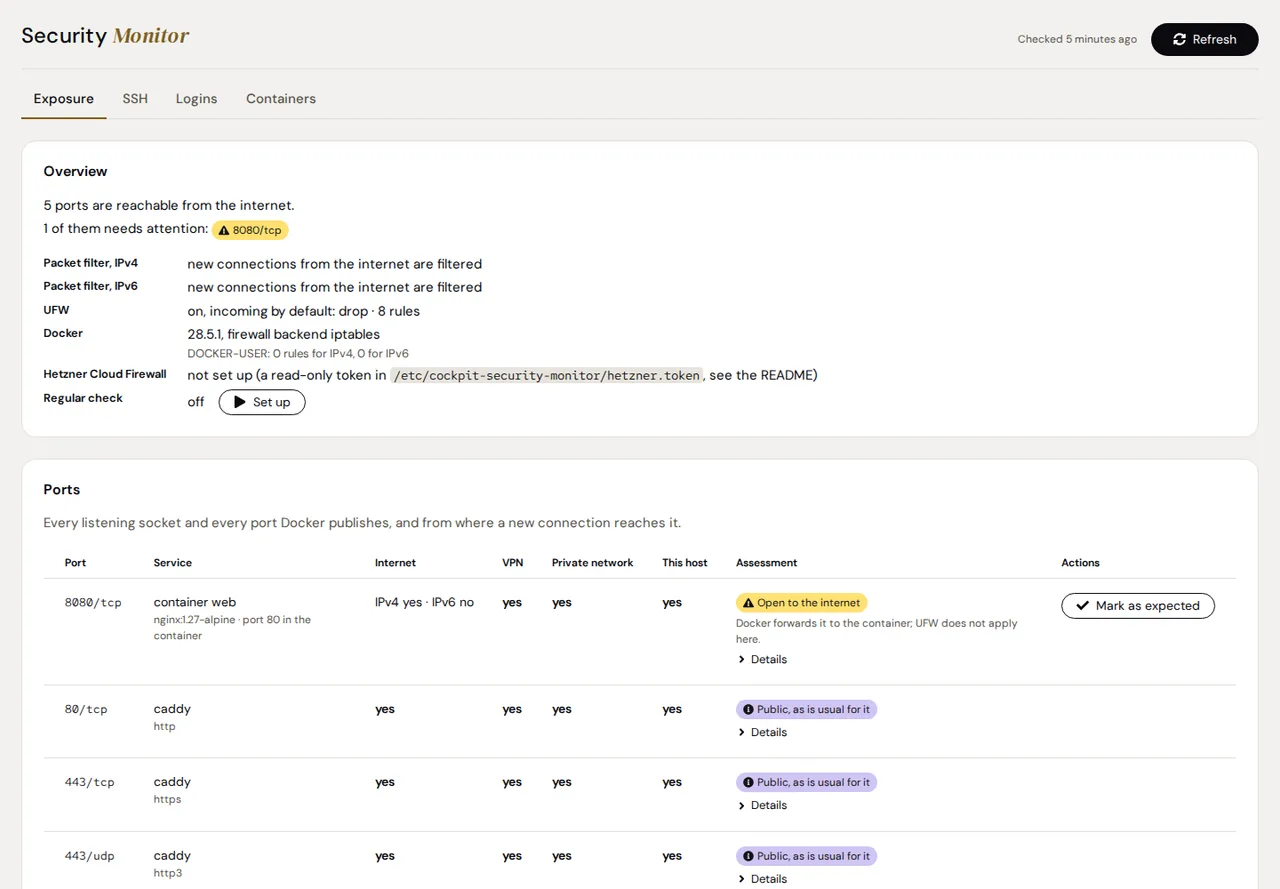
UFW is on, and the port is open anyway.
Docker forwards the ports it publishes past UFW: a rule that blocks the port does not reach the container behind it.
Cockpit's own firewall page does not show UFW, nor the ports Docker forwards past it.
A fail2ban jail that bans only at INPUT does not reach a port Docker forwards to a container.
Features
What it does
Exposure per port
Every listening socket and every port Docker publishes: reachable from the internet, the VPN, the private network or this host, per IPv4 and IPv6, with the rule or policy that decides.
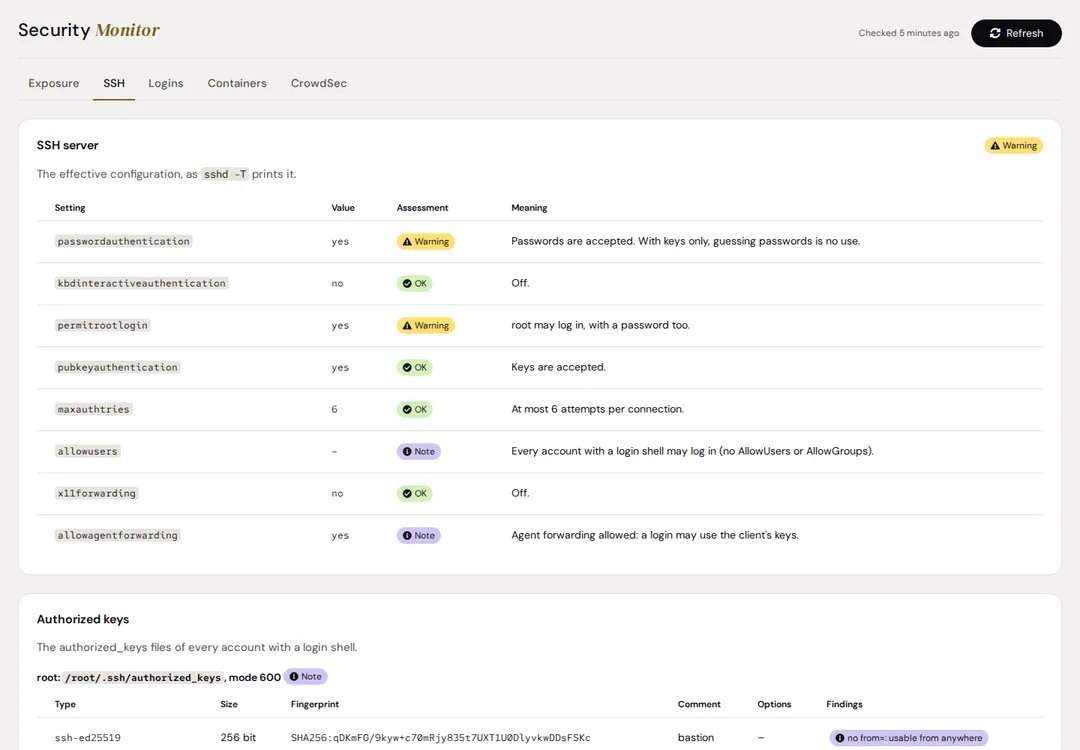
SSH configuration and keys
The effective configuration as sshd -T prints it, and the authorized keys of every account with a login shell: type, size, fingerprint, comment and options.
Logins of 14 days
Successful logins with source, account and method, and failed attempts per source, from the journal. A login from outside the VPN and private networks is a warning.
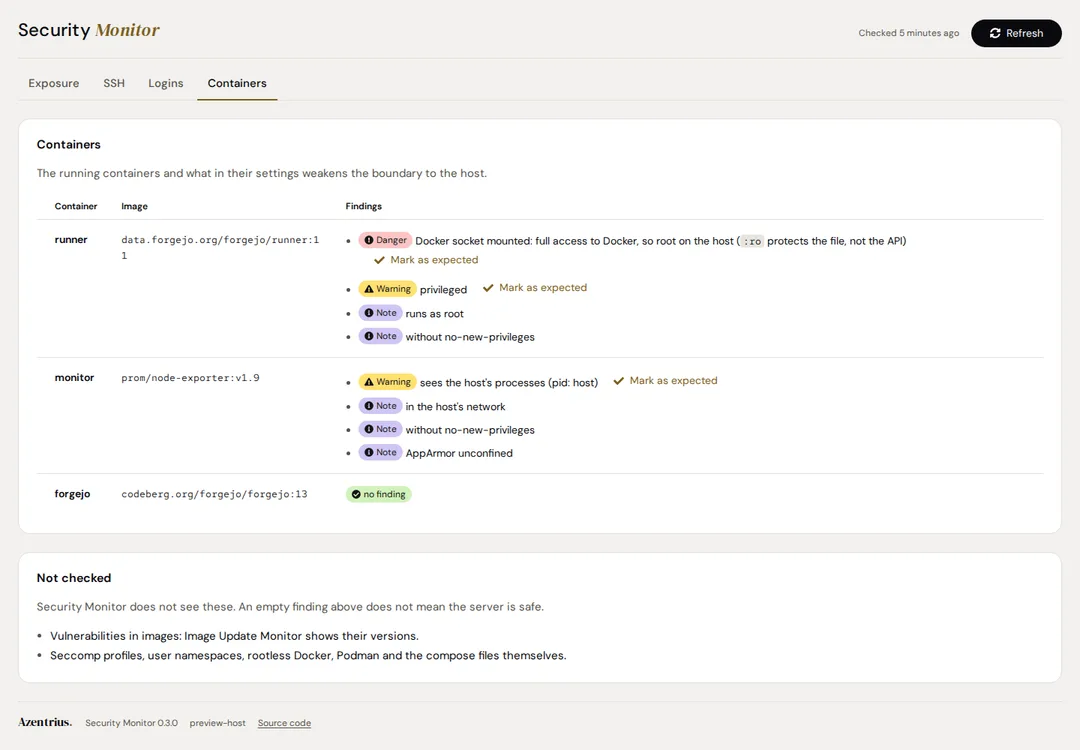
Container hardening
The Docker socket mounted, privileged containers, host PIDs, extra capabilities, writable host folders, the host network, and containers that run as root or without no-new-privileges.
CrowdSec and fail2ban
When installed: CrowdSec's service, bouncers and decisions; for fail2ban what each jail watches, whom it bans and where a ban does not take effect.
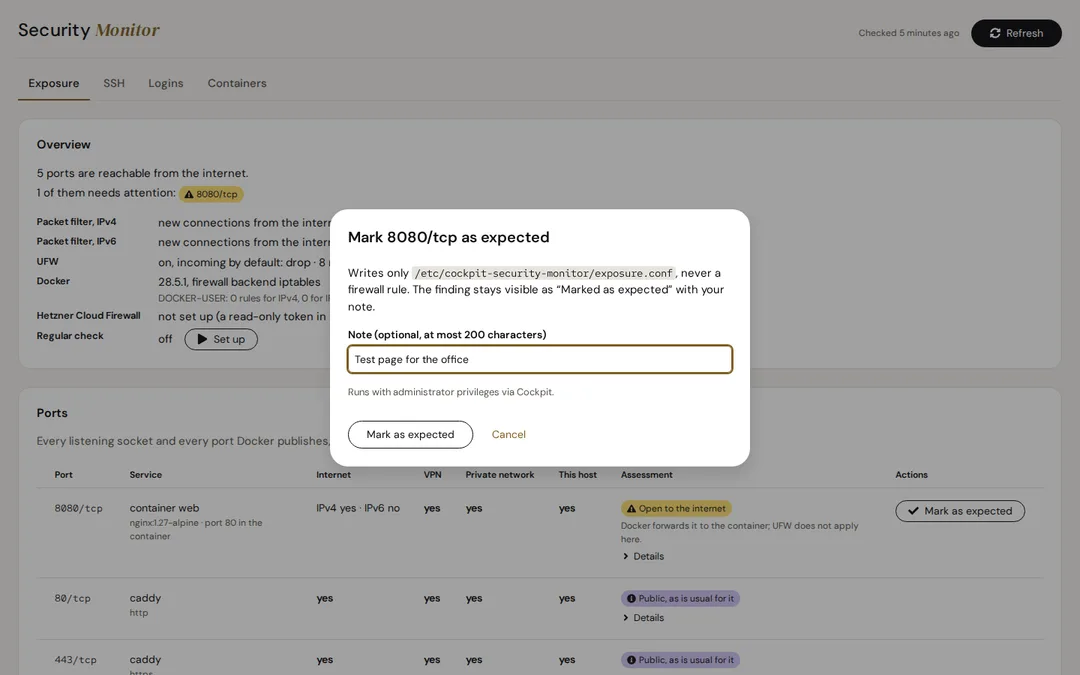
Marked as expected
A port that is meant to be public, or a container that needs the Docker socket, can be marked as expected with a note. It stays visible and no longer raises the state.
How it judges a port
OK means that nothing was found in what the page checks, never that the server is safe. What it cannot read is “Not assessable”, never OK.
| Port | Assessment |
|---|---|
| A database, Docker's API, Cockpit or SSH open to the internet | Danger |
| Anything else open to the internet | Warning, until you mark it as expected |
| Web (80, 443), WireGuard, the DHCP client | Note |
| Reachable only from some addresses | Note |
| Blocked by the Hetzner Cloud Firewall (optional, with a read-only token) | OK |
| Decided by a rule the page cannot read | Not assessable |
Screenshots
Security
- Read only: it changes no firewall rule and nothing in CrowdSec or fail2ban. The page changes only its own regular check and its own list of findings marked as expected.
- The scan runs as root without network access except the loopback, with a reduced set of capabilities, and writes only its own folder.
- Docker is asked with GET only, fail2ban only what it runs and whom it bans.
- The Hetzner token is used by a service user of its own and never reaches root code or the browser.
- Addresses, user names and key comments stay in a file only root can read. The Status Board sees numbers, states, ports and the names of services, containers and jails.
Install
Installation
Requirements
- Debian 12 or newer, or Ubuntu 22.04 or newer, with systemd
- Cockpit 264 or newer
- Python 3.8 or newer (standard library only) and iproute2
- Read when present: iptables, nftables, UFW, Docker, OpenSSH, CrowdSec, fail2ban
From the Azentrius package repository
For Debian and Ubuntu. Set up the repository once:
curl -fsSLO https://packages.azentrius.com/azentrius-repository.deb
sudo apt install ./azentrius-repository.deb
sudo apt update
Then install Security Monitor in Cockpit under Applications, or on the console:
sudo apt install cockpit-security-monitor
The system’s updates keep it current. Install it on every server you look at in Cockpit, then open the page once with administrative access: it checks the server by itself. Set up the regular check there to keep the state, and the Status Board, current.
From the files of a release
Every release has the .deb, SHA256SUMS and a signed build provenance. Check both before you install:
sha256sum --ignore-missing -c SHA256SUMS
gh attestation verify cockpit-security-monitor_X.Y.Z-1_all.deb --repo Azentrius/cockpit-security-monitor
sudo apt install ./cockpit-security-monitor_X.Y.Z-1_all.deb
The Hetzner Cloud Firewall, marks by hand and uninstalling: see the README.
Questions
Does it change firewall rules?
No. The page says which rule is missing; you set it by hand.
Why does it say a port is open although UFW is on?
Docker forwards the ports it publishes past UFW. The page follows the packet filter after Docker's DNAT and names the rule that decides.
Does OK mean the server is safe?
No. OK means that nothing was found in what the page checks. Every tab says what it does not check, such as firewalls outside the server, outgoing connections and vulnerabilities in images.
Which systems are supported?
Debian 12 and newer and Ubuntu 22.04 and newer. Fedora, RHEL and openSUSE are not supported yet, and the package repository serves the add-on for Debian and Ubuntu only.
What about cloud firewalls?
The Hetzner Cloud Firewall is read with an optional read-only API token. Other cloud firewalls, routers and port forwarding outside the server are not checked.
Can it lift fail2ban bans?
Not yet. It shows fail2ban; setting up jails and lifting bans from the page follow in a later version.
How it differs
Cockpit's own firewall page does not show UFW or the ports Docker forwards past it. Security Monitor follows every rule a new connection passes and says from where each port is reachable. It only reads: the page names a missing rule, you set it. Missing updates are for Update Gaps, container versions for Image Update Monitor.
Further reading
Also by Azentrius
- Update Gaps – Where a server misses updates although Software Updates lists none, and for every finding why and what you can do.
- Image Update Monitor – Configured, running and newest Docker versions, with a rollback image and dumps for supported databases.
- Status Board – The state of the Azentrius add-ons on every host of Cockpit's host switcher, one row per host, one tile per add-on.